.glTF File Loader Plugin
Overview
The .glTF File Loader Plugin works in conjunction with Babylon's scene loader functions to import glTF files.
Setup
The recommended way to use the .glTF file loader plugin is via the @babylonjs/loaders ES6 NPM package. Please read Loading Any File Type for more information about installing and using the loader package in your own build.
But for testing purposes, the following compiled JS files are offered on the public CDN at https://preview.babylonjs.com/loaders/:
babylon.glTF2FileLoader.js- Only glTF 2.0babylon.glTF1FileLoader.js- Only glTF 1.0babylon.glTFFileLoader.js- Both glTF 2.0 and 1.0babylonjs.loaders.js- The full Babylon loaders packagebabylonjs.loaders.min.js- The full Babylon loaders package, minified
Usage
When using the @babylonjs/loaders package, it is preferable to register the glTF file importer via the top-level dynamic loader registration function registerBuiltInLoaders.
If you want to import the glTF file importer statically (not recommended), you can do so via:
import "@babylonjs/loaders/glTF/2.0";You can read more about NPM support.
Loading Codecs Locally
If your glTF files use any of the following features, you'll need to take a few extra steps for production use.
| Feature | glTF extension | Babylon interface |
|---|---|---|
| Draco compression | KHR_mesh_draco_compression | DracoDecoder |
| Meshopt compression | EXT_meshopt_compression | MeshoptCompression |
| .ktx2, or Basis Universal Compression | KHR_texture_basisu | KhronosTextureContainer2 |
Babylon performs extra work at load time to decompress the data that uses these extensions. By default, it will:
- Download the required decoder files from the Babylon CDN.
- Use web workers (if available) to execute the code.
This behavior can lead to issues like GDPR compliance concerns or CSP violations, so we recommend hosting these resources yourself.
How you do this depends on your setup. In general, there are two approaches.
Via URL Configuration
You can provide a different base URL (or a full URL) for all decoders, or for each decoder individually. This way, Babylon loads them from your server instead of the CDN. Read how to do this in the CDN Support docs.
Via Resource Injection
Alternatively, you can inject the decoder modules directly (or workers preloaded with them) instead of relying on Babylon to fetch them. Follow the steps in the ESM/NPM Support docs to set this up with the KTX2 and Draco decoders. (Note: Meshopt compression does not yet support injection.)
Loading the Scene
Use one of the scene loader functions to load a glTF asset. See Load from any file type.
See an example here: Load a glTF Asset
Content Security Policy for Embedded Images
A GLB file can store image bytes inside the binary file. When Babylon.js uses ImageBitmap decoding, including with WebGPU, it passes these in-memory bytes directly to the browser decoder. It does not create or fetch a blob: URL. You do not need to add blob: to connect-src only to load images embedded in a GLB file.
This behavior applies when the loader already has an ArrayBuffer, an ArrayBufferView, or a Blob. A URL string, including an application-created blob: URL, still uses the normal URL loading path and must be allowed by your Content Security Policy. The initial GLB request and external buffers or images must also be allowed by the CSP directive that covers their loading path.
WebGL can decode in-memory images through an HTML image element. If your application also supports WebGL, keep blob: in img-src when that path is used.
Extensions
See the built-in extensions in the API documentation.
You can also create your own extensions.
Options
Each of the scene loader functions accepts an options object, where you can customize the behavior of the glTF loader plugin. See the full list of available glTF options from the API documentation.
Disabling Extensions
To disable an extension on load, set its enabled option:
LoadAssetContainerAsync("asset.glb", scene, { pluginOptions: { gltf: { extensionOptions: { KHR_texture_basisu: { enabled: false, }, myCustomExtension: { enabled: false, }, }, }, },});Behavior
The __root__ node
A __root__ node is added to hold every glTF and GLB model. glTF uses a right-handed coordinate system. In Babylon.js's default left-handed scenes, the loader applies the coordinate conversion to this root; in a right-handed scene, no handedness conversion is needed.
scene.useRightHandedSystem = true;Set the scene mode before loading. Do not mirror the imported meshes a second time. loadedMeshes[0] points to the added __root__ node and loadedMeshes[1] points to the first loaded mesh.
The added __root__ is a common parent, not an authored glTF node. With the default AUTO coordinate-system mode, its rotationQuaternion is [0, 1, 0, 0] and its scaling is [1, 1, -1] in a left-handed scene. In a right-handed scene, no conversion is needed: rotationQuaternion remains null and the Euler rotation is zero. A null quaternion means the node uses Euler rotation; it does not mean imported rotations were lost.
If your application needs a quaternion on this root, initialize it only when absent, preserving any existing quaternion or Euler rotation:
import { Quaternion } from "@babylonjs/core/Maths/math.vector";const rootMesh = result.meshes[0]; // The loader-created __root__, not an authored node.rootMesh.rotationQuaternion ??= Quaternion.FromEulerVector(rootMesh.rotation);See Coordinate Systems and Handedness for axis conventions, loader behavior, and DCC interoperability guidance.
Skinning
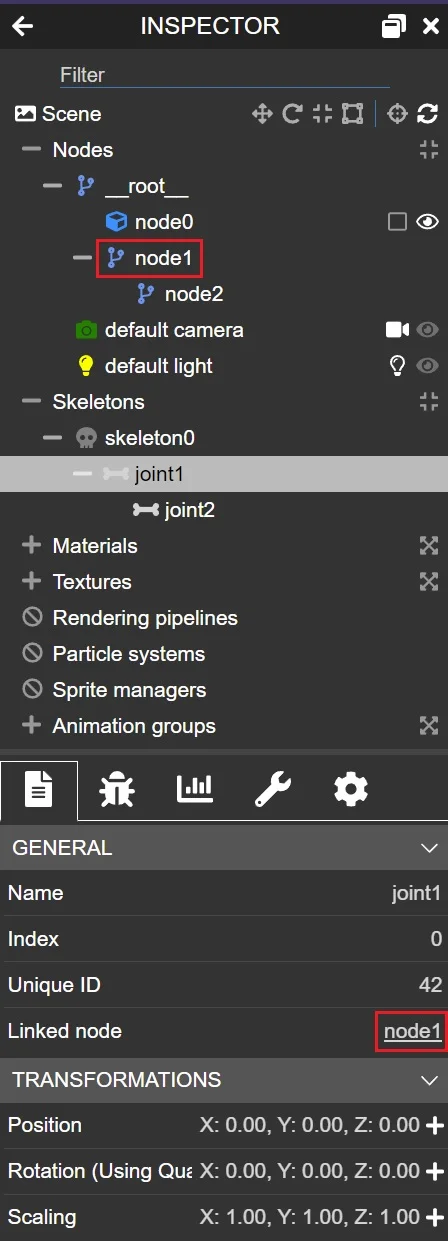
See Skinning for details on how skinning is implemented in Babylon.js for glTF 2.0.
Properties and Methods
See the available properties and methods from the API documentation.
Version 1 Only
Though deprecated, Babylon maintains a dedicated glTF loader plugin for glTF 1.0.
Properties
IncrementalLoading
Set this property to false to disable incremental loading, which delays the loader from calling the success callback until after loading the meshes and shaders. Textures always load asynchronously. For example, the success callback can compute the bounding information of the loaded meshes when incremental loading is disabled. Defaults to true.
import { GLTFFileLoader } from "@babylonjs/loaders/glTF/glTFFileLoader";GLTFFileLoader.IncrementalLoading = false;HomogeneousCoordinates
Set this property to true in order to work with homogeneous coordinates, available with some converters and exporters. Defaults to false.
import { GLTFFileLoader } from "@babylonjs/loaders/glTF/glTFFileLoader";GLTFFileLoader.HomogeneousCoordinates = true;Coming next
Progressively Load .glTF Files
Learn about progressively loading .glTF files in Babylon.js.

glTF 2.0 Skinning
Learn about the implementation details for how skinning is implemented in Babylon.js
KHR interactivity
Learn how Babylon.js loads, validates, runs, inspects, and exports ratified KHR_interactivity graphs.
Create glTF extensions
Learn about creating new glTF loader extensions.