Scene Exporter
Version note: The exporter interface and available options can change between toolkit releases. The sections below provide an overview of the exporter panel; use the maintained Unity Exporter guide for current editor requirements and installation instructions, and the Babylon Toolkit Editor releases for versioned packages.
The scene exporter panel is the primary toolkit interface. Open or dock it while configuring and exporting a project.
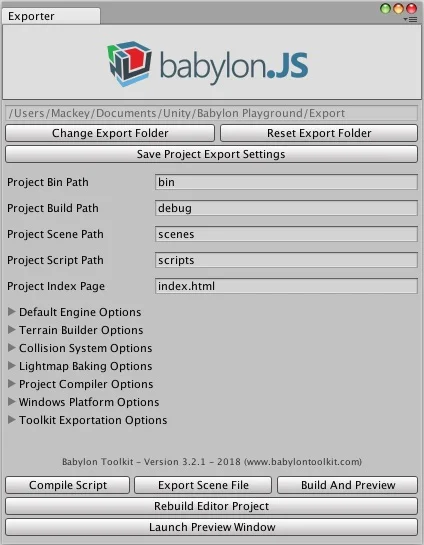
Global Export Options
-
Project Bin Path - Specifies the exported project binary path.
-
Project Build Path - Specifies the exported project build path.
-
Project Scene Path - Specifies the exported project scene path.
-
Project Script Path - Specifies the exported project script path.
-
Project Index Page - Specifies the exported project index page.
Default Engine Options
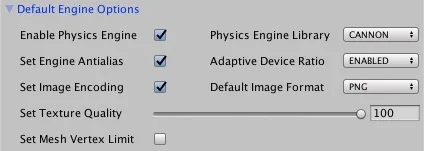
-
Enable Physics Engine - Enables or disables the built-in physics engine.
-
Default Physics Engine - Specifies the default physics engine for the project.
-
Set Engine Antialias - Enables or disables the engine antialias option.
-
Adaptive Device Ratio - Sets the engine to adapt to device ratio.
-
Set Image Encoding - Enables or disables default image encoding options.
-
Default Texture Format - Specifies the default image encoding format.
-
Set Texture Quality - Sets the default texture image quality.
-
Set Mesh Vertex Limit - Enables or disables the static mesh vertex limit (65000).
Terrain Builder Options
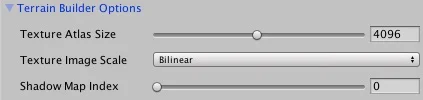
-
Terrain Scale Factor - Sets the shader texture scale factor for all terrain splatmaps.
-
Texture Atlas Size - Sets the terrain splatmap texture atlas maximum size.
-
Texture Image Scaling - Sets the mode when scaling tile images to point or bilinear.
-
Shadow Lightmap Index - Sets the lightmap index channel. Must be 0 or 1.
Collision System Options
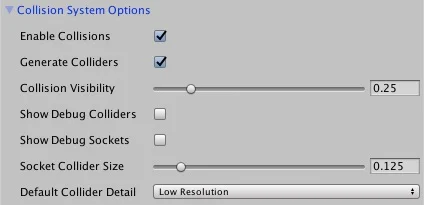
- Enable Collisions - Enables the built-in collision mesh system.
- Generate Colliders - Automatically generates collision meshes for each collider component.
- Collision Visibilty - Sets the default collision mesh visibility level for debugging.
- Show Debug Colliders - Shows all collider component collision meshes for debugging.
- Show Debug Sockets - Shows all socket component collision meshes for debugging.
- Socket Collider Size - Sets the size of the socket component collision mesh for debugging.
- Default Collider Detail - Sets the collision mesh geometry detail level for all generated mesh colliders.
Lightmap Baking Options
-
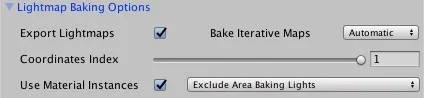
Export Lightmaps - Enables the built-in shadow lightmap baking system.
-
Bake Iterative Maps - Enables the built-in final lightmap gather and bake option.
-
Coordinates Index - Sets the default texture coordinate index for lightmaps.
-
Use Material Instance - Enables or disables material instances for shared material lightmaps.
-
Area Baking Lights - Includes or excludes lightmap area baking lights in the exported scene.
Project Compiler Options
-
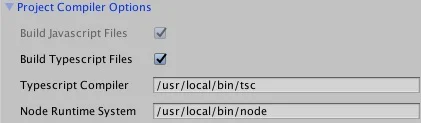
Build Typescript Files - Enables or disables optional runtime script compiler.
-
Typescript Compiler - Specifies the default TypeScript compiler location.
-
Node Runtime System - Specifies the default Node runtime system location.
Windows Platform Options
-
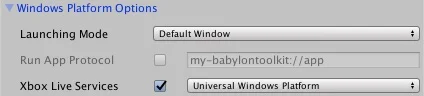
Launching Mode - Specifies the initial UWP application window state.
-
Run App Protocol - Enables and specifies the UWP application protocol.
-
Xbox Live Services - Enables the toolkit managed Xbox Live Service API.
-
Xbox Live Plugin - Launches the toolkit managed Xbox Live Service API NuGet install info.
-
Switch Windows Sandbox - Launches the toolkit's local Windows Sandbox Switcher administrative tool.
Toolkit Exporter Options
-
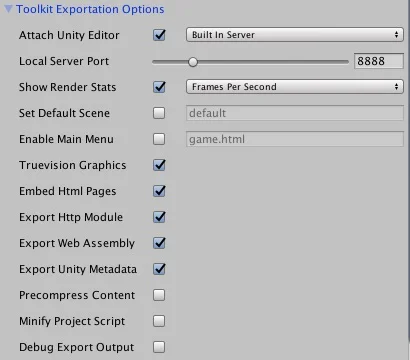
Attach Unity Editor - Enables the built-in toolkit play, build, and preview features.
-
Host Preview Server - Toggles internal and external web server hosting options for the project.
-
Default Server Port - Specifies the default web server host port for previewing the scene.
-
Remote Server Path - Specifies the remote server host address for the external server option.
-
Show Render Stats - Toggles the default page options for debug rendering stats in the project.
-
Set Default Scene - Sets the index page default scene name option for the project.
-
Enable Main Menu - Toggles the HTML project main menu page options for the project.
-
Truevision Graphics - Toggles the native TARGA image file support options for the project.
-
Embed Html Pages - Toggles options for embedding internal HTML pages into the markup store for the project.
-
Export Http Module - Enables the web server http scene content management module.
-
Export Web Assembly - Enables or disables the exported wasm content option.
-
Export Unity Metadata - Enables or disables the default scene object metadata.
-
Precompress Contents - Enables or disables the exported precompressed content option.
-
Minify Project Scripts - Enables or disables the exported script minification option.
-
Debug Exporter Output - Enables or disables pretty print json and compiler source maps.
Scene Builder Options

- Compile Script - Compiles the project's TypeScript files only, with no previewing.
- Export Scene File - Exports scene-only content with no compiling or previewing.
- Build And Preview - Exports a full scene build with compiling and optional previewing.
- Rebuild Editor Project - Rebuilds the native Unity Editor project source code.
- Launch Preview Window - Launches the current preview build in the browser.
Output Window
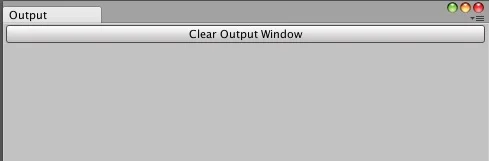
The output window traces the toolkit export progress for every build. Any exported camera, light, or mesh detail information will appear in this window. The output window can be docked in the editor during game development for easy access.