Static Batching
Static batching allows the engine to reduce draw calls for geometry of any size, provided it shares the same material and does not move. It is often more efficient than dynamic batching (it does not transform vertices on the CPU), but it uses more memory.
In order to take advantage of static batching, you need to explicitly specify that certain game objects are static and do not move, rotate or scale in the game. To do so, set the game object to the Babylon Static layer.
Please refer to the Unity Layer documentation for details.
Babylon Static Layer
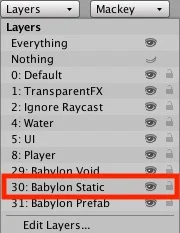
The static batching layer can prepare your objects to take advantage of the toolkit's static batching export. This step is a useful performance optimization that allows the engine to reduce the number of draw calls dramatically while keeping the amount of rendered geometry intact.
By setting game objects to the Babylon Static layer, you create internal meshes at export time that contain combined geometry. This allows game objects to remain separate pieces at design time, making it easy to place and move static geometry. You can also use the Geometry Tools to pre-bake and combine meshes at design time. Any pre-baked meshes will no longer be separate movable meshes during game development.
Game objects with the same material will be batched together, so it is useful to share as many textures and materials as you can. Texture Atlas support is also included in the toolkit to help improve rendering performance.