How to use BabylonJS with Vue - messages driven scene
Prerequisites
Clone the repo at https://github.com/RolandCsibrei/babylonjs-vue-messages-driven-scene and install it. Instructions can be found on the repo's home page.
You can also check the application running at https://babylonjs.nascor.tech/scene-director/
The problem
If you expose BabylonJS objects and manipulate them directly with Vue, you will sooner or later end up with very low FPS caused by multiple redraws of the scene. The reason is that you interfere with Vue's reactivity and things get called repeatedly.
The solution
Do not expose BabylonJS objects, and always send a copy of your objects in your methods, or simply use JSON for your data.
Choosing JSON?
So do you have to JSON.stringify and JSON.parse every piece of data you are passing between Vue and BabylonJS? Yes, but we can write a class which will help us to do so with minimal effort.
Having everything in JSON opens up new possibilities, so we can leverage a messaging bus for easy data passing between the two frameworks.
The idea behind messaging
We don't want our Vue code to know about BabylonJS implementation details. We want methods we can call that ensure the required tasks are done. Let's jump to the example project; it will be easier to follow how the data is passed and received.
The Marble example
This example uses the Mitt bus (https://github.com/developit/mitt), but you can use any messaging bus. In Vue 2, you can use new Vue() to create a bus.
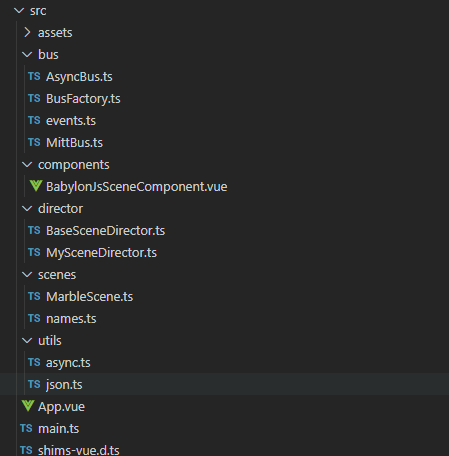
assets - you all know
bus - the Mitt bus wrappers
components - our Vue component which displays the BabylonJS scene
director - our layer between Vue and BabylonJS
scenes - our BabylonJS scene
utils - some utility methods
The Bus
Now that we can use messaging to communicate between Vue and BabylonJS, how about making this communication async, so that, for example, a method called by Vue can await a method running in BabylonJS code? We can simply create an async wrapper around the synchronous bus.
Let's introduce an interface for our message bus. I will show you only the AsyncBus implementation. The synchronous bus is pretty much the same. This interface must be implemented by our bus.

as seen in AsyncBus.ts it implements this interface.
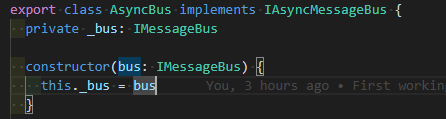
AsyncBus is just a facade and uses the Mitt bus under the hood, but adds asynchronicity to our messaging.
The Scene Director
The Scene Director is a simple method-call-to-message converter. Your Vue code calls methods on the SceneDirector, which creates messages and sends them using our AsyncBus. As long as our BabylonJS scene is interested in a message (that is, it is subscribed to process a particular message—basically, this calls Mitt.$on(messageType, callback) at a low level), it gets executed. When execution finishes, the BabylonJS scene has to notify the Scene Director that it has finished. The Scene Director awaits every sent message by listening for a response with the specific message type SceneDirectorEventBusMessages.SceneDirectorCommandFinished, along with additional information about the executed command, including the return value in payload. Don't worry—there are helper methods, and the usage is very easy.
Let's jump to Vue!
Vue page
This example uses App.vue for the whole UI, but you should not put everything here and it is a good idea to have a router at hand and of course use pages/layouts/views/components for better modularity of your project.
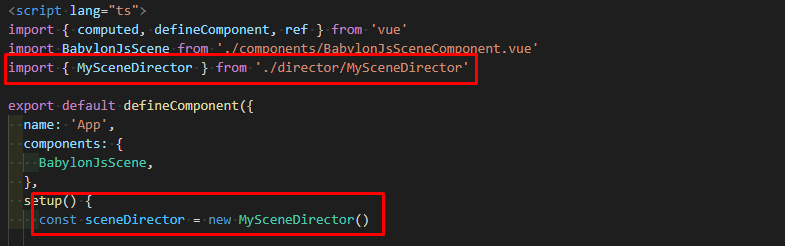
First of all, you have to import our SceneDirector class and create an instance so you can call its methods.
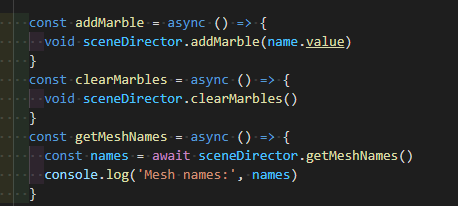
The example application comes with three methods. As you can see, all methods are async. I marked some methods as void because I just don't want to await methods returning void for now. However, the getMeshnames method has a return type of string[], and I am interested in the result, so I must use await here.
Scene Director methods
OK, so let's see our method implementation in the Scene Director.
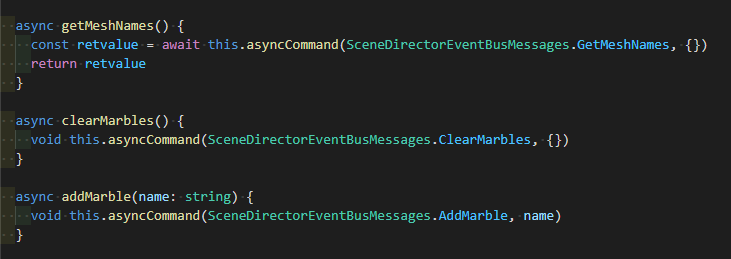
All we do here is call a helper method called asyncCommand.

where we need to specify the message type and, if we have something to send, the payload.
Message types
We have to specify what messages we are going to send through our bus, so we have this:
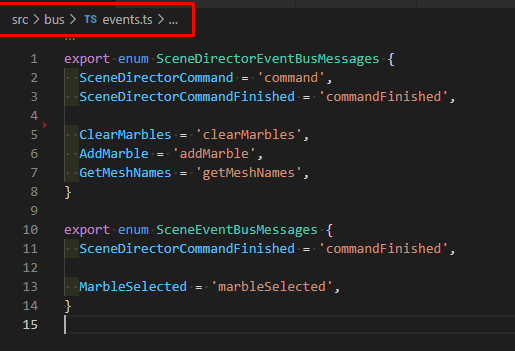
There are two types of messages. This is just for better readability—you can put them under one enum if you like. SceneDirectorEventBusMessages are sent from Vue to BabylonJS, and obviously the second one moves from BabylonJS toward Vue.
It is a good idea not to create a message type for every single action. For example, you are not going to create a LookLeft message and a LookRight message. Instead, you will create a LookAt message and call it with a parameter. However, in your SceneDirector you can still have two separate methods, so Vue just calls LookLeft or LookRight, and the SceneDirector sends a LookAt message with a parameter like { rot: - Math.PI / 2 } or { rot: Math.PI / 2 }, which will set the camera's alpha, for example.
BabylonJS scene
You simply register your message subscriptions by modifying this method:
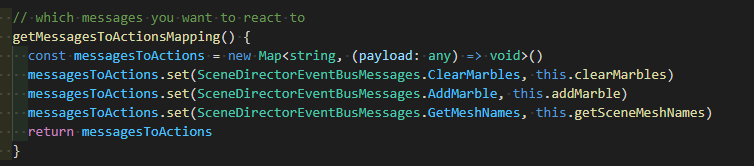 So it maps message types to functions.
Let's have a look at the functions:
addMarble adds a new marble (maybe atoms should be a better name, just look at the page screenshot below)
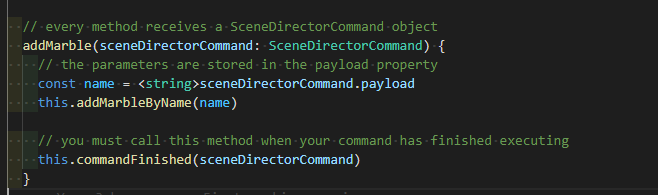 As seen on the screenshot above, every mapped method receives a command. The
 payload stuff has to be clear for all of you, if not, you can access the payload sent by the SceneDirector here, in our case the name of the marble.
addMarbleByName just does this:
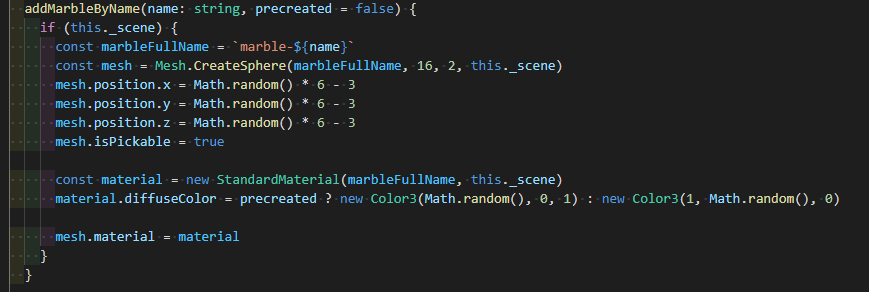
The very important thing here is to call this.commandFinished(sceneDirectorCommand) after your method has finished. If you started an animation and want to wait for it, no problem—just call this.commandFinished(sceneDirectorCommand) in your animation end callback.
If you want to send a message towards Vue, you can use
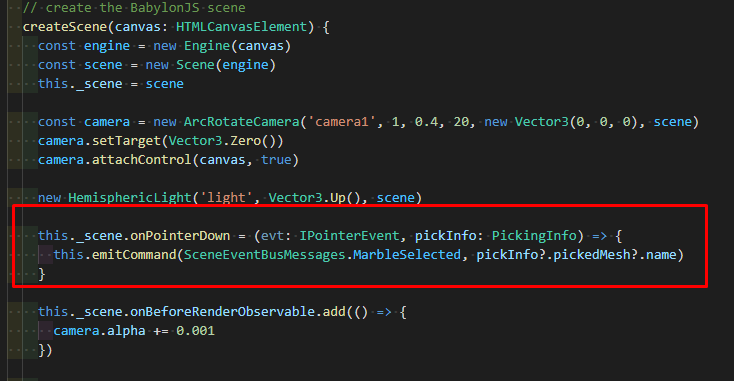
where this.emitCommand is just a helper method.

and don't forget to register your message in SceneDirector (MySceneDirector in our example)
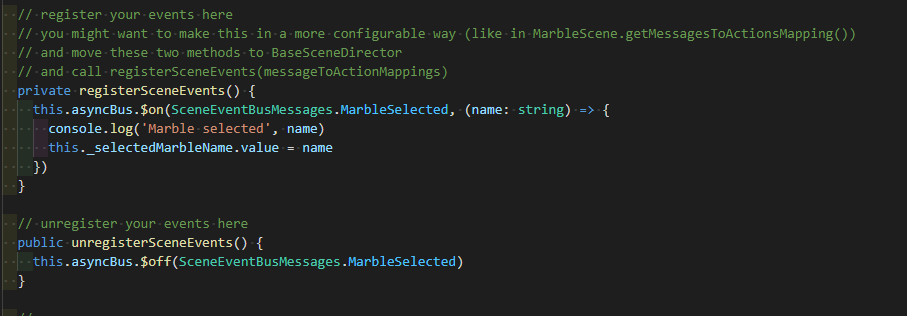
Unregistering events is also a must :) Just take your time :slight_smile:
Vue ref
In App.vue we can use some data from the SceneDirector

what is a simple ref:
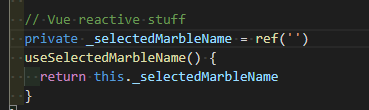
and whenever a MarbleSelected message arrives, we just set the ref's value.

You should always prefer a loosely coupled architecture for your solution, so you would rather use a callback instead of a ref and avoid referencing any Vue object in SceneDirector. That way, you could replace Vue with any other framework and would not have to rewrite any BJS-related method. The Vue ref is used here only as an example of how to use refs. However, if you are going to stick with Vue, ref is the way to go.
The example app
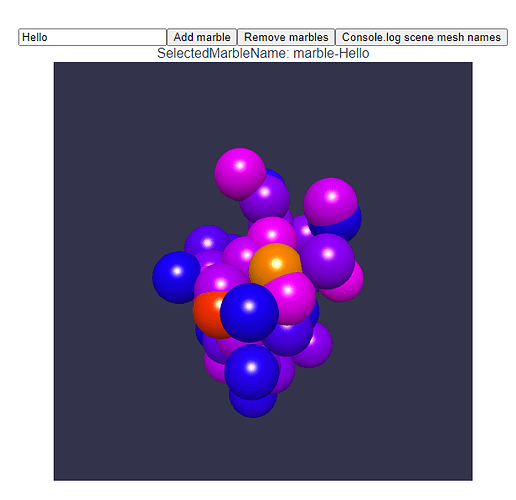
The app creates 40 marbles on startup. You can add a marble by entering its name in the text input and clicking Add marble. The Remove marbles button will remove some of the marbles with each click. The last button will query the scene for all mesh names and print them to the console. The methods are described above in the ##Vue page## section.
WebWorkers
So we have a message-driven scene?! You can easily move your BabylonJS scene to a WebWorker!! Or you can control your scene with external messages—for example, light sensors can deliver messages for controlling light.intensity on BabylonJS lights...
Message flow logged in the console
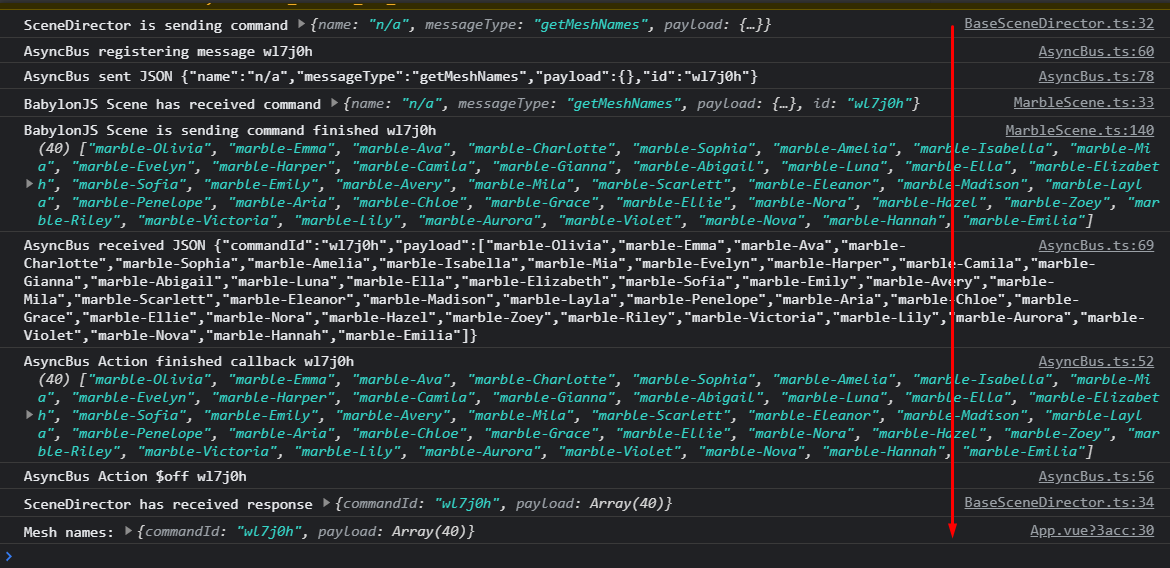
Example of a getMeshNames message flow from the SceneDirector to MarbleScene and back to SceneDirector, where it finally gets console.logged in App.vue:
Links
You can find a quick prototype using this technique running here https://babylonjs.nascor.tech/scene-director/
Source code repository using Vue3 is at https://github.com/RolandCsibrei/babylonjs-vue-messages-driven-scene
All links from this tutorial at one place
Part 1 of this tutorial
Part 2 of this tutorial
Part 3 of this tutorial